
AI Model Type: LLM Provider
Connect the chatbot to cloud AI services through the Symfony AI Agent. This is the recommended mode for the best out-of-the-box conversational quality.
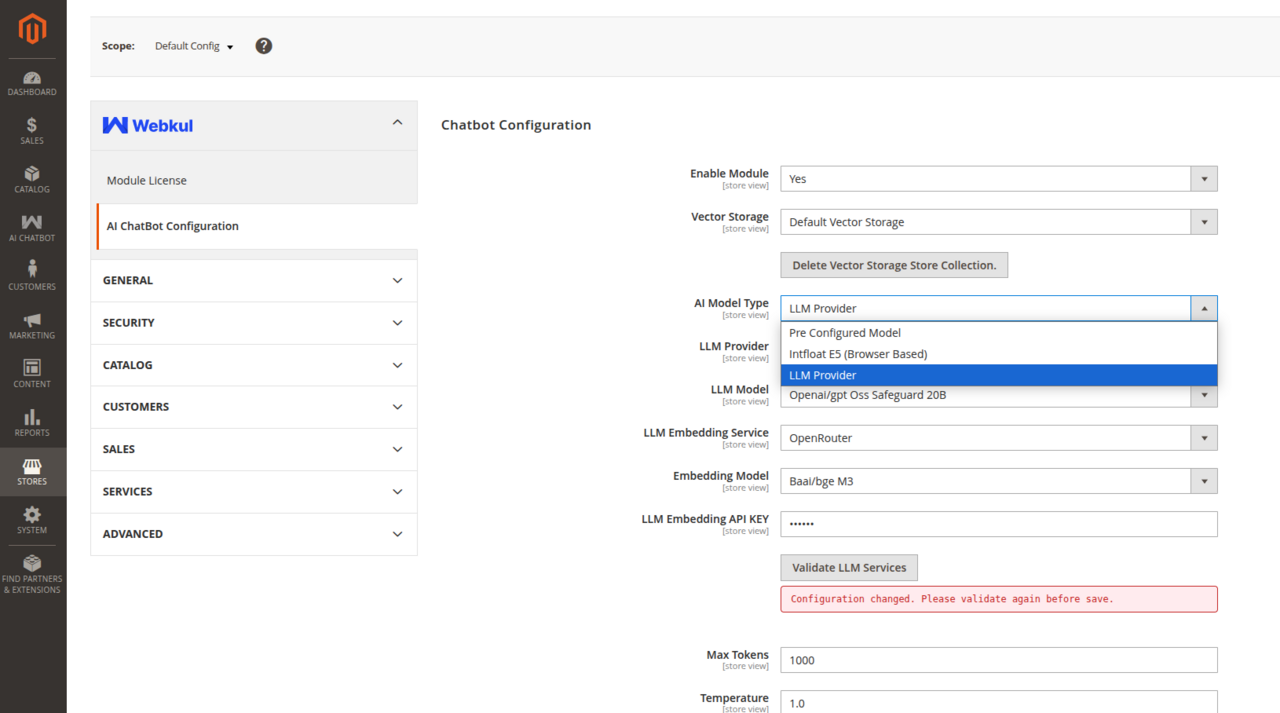
LLM Provider Fields
| Field | Description |
|---|---|
| LLM Provider | Select your cloud provider: OpenAI, Google Gemini, Anthropic, OpenRouter, Cerebras, or DeepSeek. |
| LLM Model | Select the chat model for conversational responses (e.g., gpt-4o-mini, gpt-4o, gemini-1.5-flash, claude-3-5-sonnet). |
| LLM Embedding Service | Select the provider for vector embedding generation. |
| Embedding Model | Select the embedding model (e.g., text-embedding-3-small, text-embedding-004). |
| LLM Embedding API KEY | Enter the API Key for the embedding service (if different from the main chat API key). |
| Validate LLM | Interactive button that validates API key connectivity against the selected provider before saving. |
| Max Tokens | Maximum number of tokens generated in a single chatbot response (e.g., 512 or 1024). |
| Temperature | Controls response creativity vs determinism from 0.0 (factual, predictable) to 1.0 (creative). Recommended: 0.3 – 0.7. |