
Category & Search Events
These events fire while shoppers browse and discover products — on category pages, search results, and comparison.
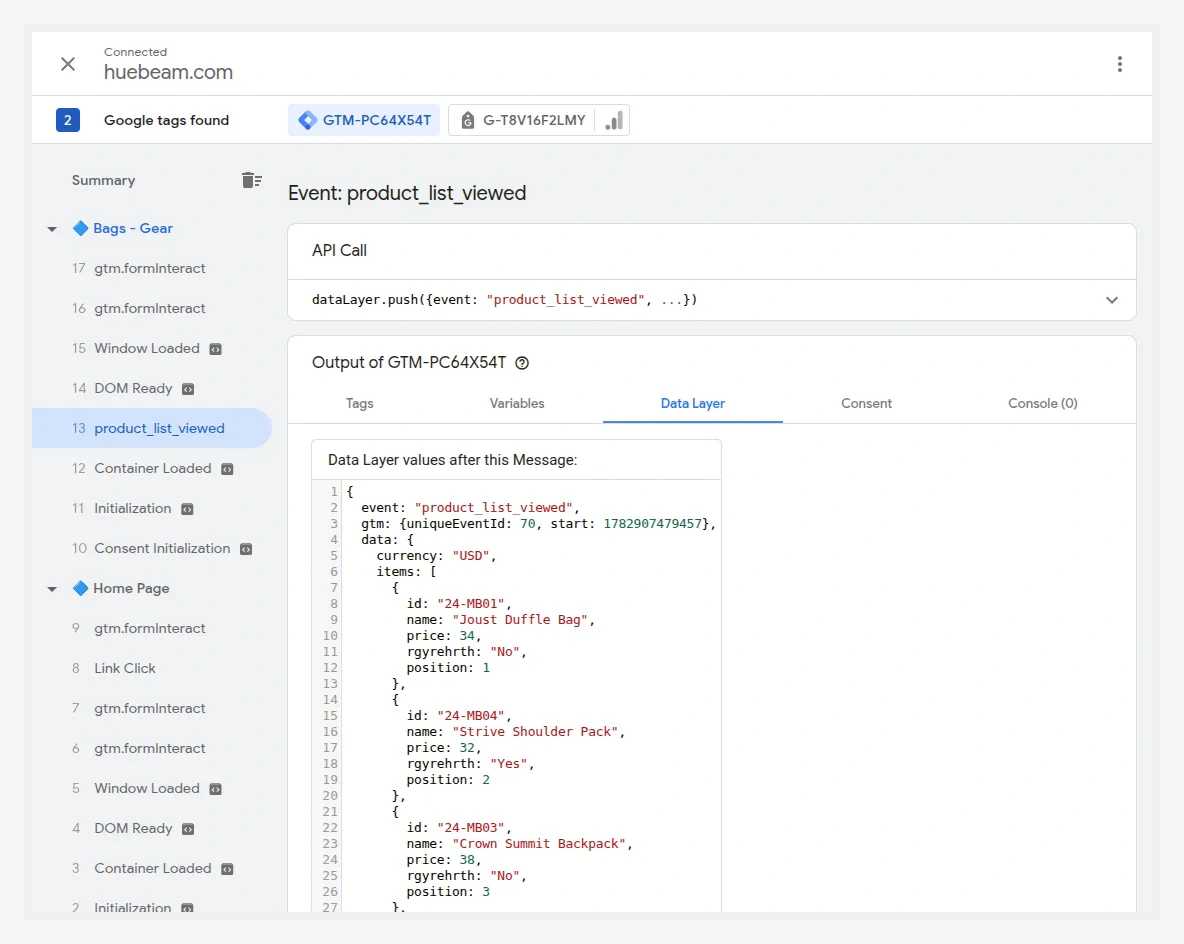
Events
| Event | Fires when | Key payload |
|---|---|---|
product_list_viewed | A category or search results list renders. | items[] with item_id, item_name, price, index, item_list_name |
product_clicked | A shopper clicks a product in a list. | the clicked item + item_list_name |
search_performed | A shopper runs a catalog search. | search_term |
product_compared | A product is added to compare. | the item |
Product listing impressions
product_list_viewed is configured as a multiselect — you choose which lists count as impressions (category pages, search results, upsells, related, and so on). Select only the lists you care about; see Shopper Actions to Track.
Each item in the list carries its position via index, and the list is named with item_list_name so you can tell a category impression from a search impression in your reports.
Example — category impression
{
  "event": "product_list_viewed",
  "data": {
    "item_list_name": "Bags",
    "items": [
      { "item_id": "24-MB01", "item_name": "Joust Duffle Bag", "price": 34.00, "index": 1 },
      { "item_id": "24-MB04", "item_name": "Strive Shoulder Pack", "price": 32.00, "index": 2 }
    ]
  }
}
Example — search
{
  "event": "search_performed",
  "data": { "search_term": "duffle bag" }
}
Verify
Open a category page in GTM Preview mode and confirm product_list_viewed appears with the products in view; click a product and confirm product_clicked fires.