
Tracking Data Tuning
The Tracking Data Tuning group controls how the data in each event is shaped, so the numbers in your analytics match how you actually report revenue. These options do not change which events fire — they change the values inside them.
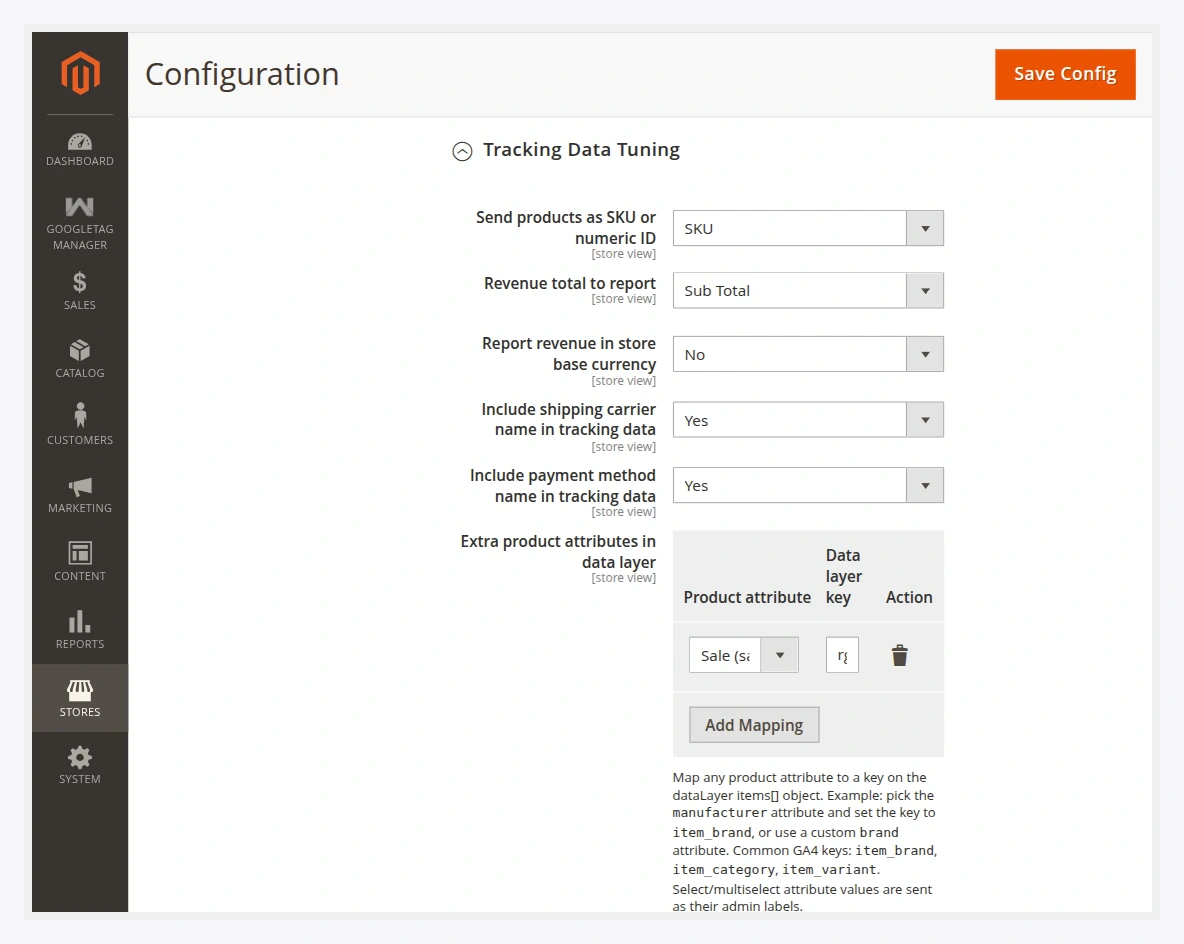
Fields
| Field | Options | What it does |
|---|---|---|
| Send products as SKU or numeric ID | SKU / ID | Chooses whether item_id carries the product SKU or the numeric entity ID. Match this to how your destination catalog is keyed (for example your Google Merchant Center or Meta catalog feed). |
| Revenue total to report | Grand total / Subtotal / … | Which order total is sent as purchase value. |
| Subtract tax from reported revenue | Yes / No | Removes tax from the reported value. (Only when revenue basis is grand total.) |
| Subtract shipping from reported revenue | Yes / No | Removes shipping from the reported value. (Only when revenue basis is grand total.) |
| Report revenue in store base currency | Yes / No | Sends amounts in the base currency instead of the display currency. |
| Include shipping carrier name in tracking data | Yes / No | Adds the carrier/shipping method title to relevant events. |
| Include payment method name in tracking data | Yes / No | Adds the payment method title to relevant events. |
| Attribute mapping | grid | Map extra Magento product attributes onto item fields (for example brand, category, colour) so they travel with every product in the event. |
Choosing a revenue basis
The most common question is "which number should I send as purchase value?" — the answer depends on how your ad platforms and finance team count revenue:
- Grand total is the amount the customer paid. Combine with Subtract tax and Subtract shipping if you want to report merchandise revenue only.
- Subtotal reports merchandise value directly, before shipping and tax.
Pick the basis that matches your reporting elsewhere so Google Ads / GA4 ROAS lines up with your books.
SKU vs numeric ID
item_id must match the product identifier your destination expects:
- If your Google Merchant Center or Meta catalog feed is keyed by SKU, choose SKU.
- If your feeds use the numeric product ID, choose ID.
A mismatch here is the most common reason dynamic remarketing "product not found" warnings appear — the IDs on the event must equal the IDs in the catalog feed.
Attribute mapping
Use the Attribute mapping grid to attach additional product attributes (brand, colour, material, custom attributes) to every item in the dataLayer. Map the Magento attribute code to the field name your tags expect. This keeps enrichment in one place instead of hard-coding it into individual tags.
After changing tuning options, flush the cache:
php bin/magento cache:flush