
Consent & PII (GDPR / CCPA)
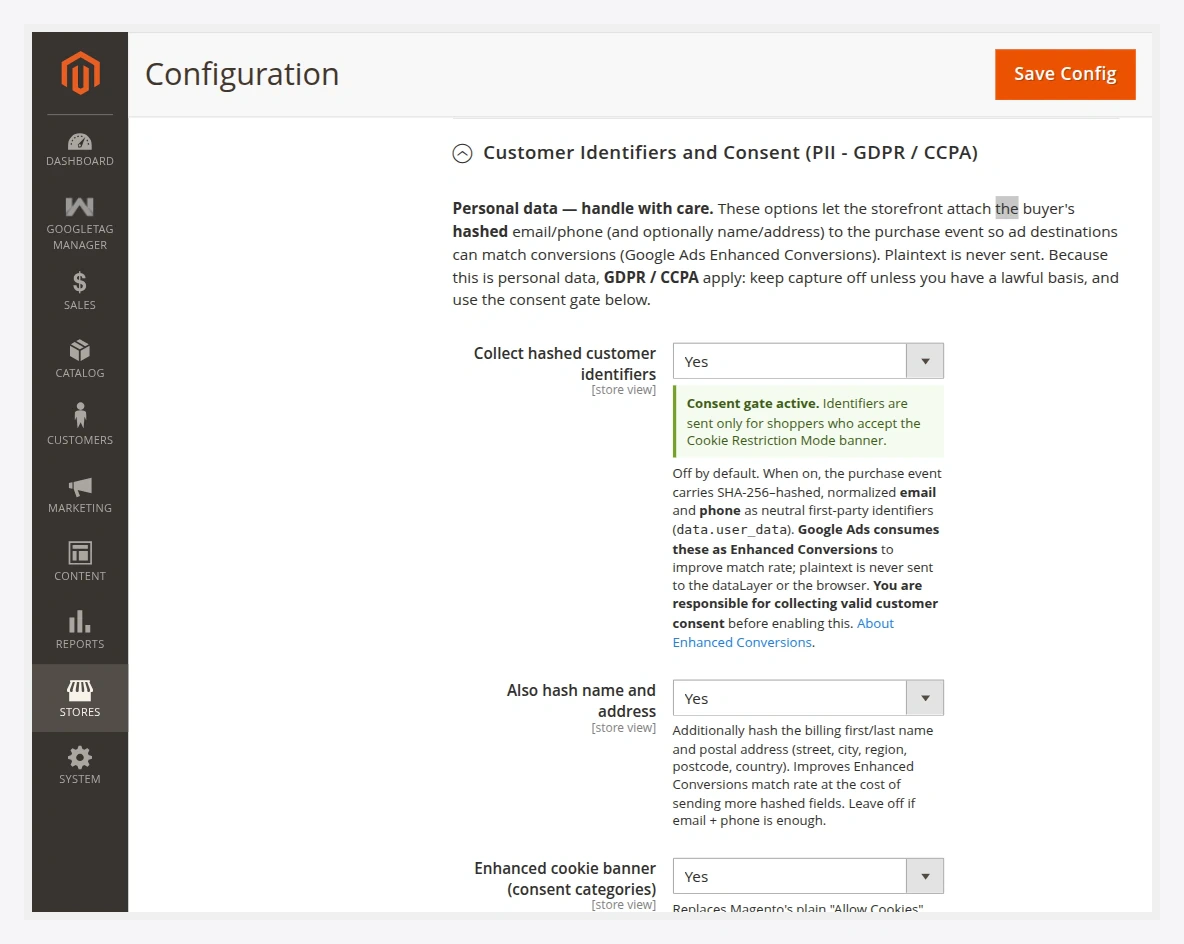
The Customer Identifiers and Consent (PII — GDPR / CCPA) group lets the storefront attach the buyer's hashed identifiers to the purchase event so ad destinations can match conversions (Google Ads Enhanced Conversions). It also controls the consent gate and an optional cookie banner.
Personal data — handle with care
These options process personal data, so GDPR / CCPA apply. Keep capture off unless you have a lawful basis, and use the consent gate. Plaintext is never sent — identifiers are SHA-256 hashed and normalized in the browser before they reach the dataLayer. You are responsible for collecting valid customer consent before enabling capture.
Fields
| Field | Default | What it does |
|---|---|---|
| Collect hashed customer identifiers | Off | When on, the purchase event carries SHA-256–hashed, normalized email and phone as neutral first-party identifiers (data.user_data). Google Ads consumes these as Enhanced Conversions to improve match rate. |
| Also hash name and address | Off | Additionally hashes billing first/last name and postal address (street, city, region, postcode, country) to improve match rate at the cost of sending more hashed fields. |
| Require consent before sending identifiers | On | The consent gate. When on, hashed identifiers are only attached if the shopper has granted consent. Fail-closed: no consent → no identifiers. |
| Enhanced cookie banner (consent categories) | Off | Replaces Magento's plain cookie notice with a category-based consent banner that gates Google Tag Manager loading. |
How the consent gate works
The identifier capture is fail-closed: if consent is required and the shopper has not granted it, the hashed identifiers are simply not attached to the event. Nothing personal leaves the browser without a positive signal.
The enhanced cookie banner
Turning on Enhanced cookie banner extends Magento's native cookie notice into a category consent banner. It stores the shopper's choice in a wkgtm_cookie_consent cookie and gates the client-side GTM loader accordingly.
Full-grant model
Because Magento's Full Page Cache cannot branch per-cookie on the server, the client-side loader uses a full-grant model: Google Tag Manager loads only when the shopper grants all tracking categories, otherwise it does not load at all. This keeps consent honest under FPC.
What is sent — and what is not
- Sent (when enabled and consented): SHA-256 hashes of normalized email and phone, optionally hashed name/address, under
data.user_data. - Never sent: plaintext email, phone, name, or address — not to the dataLayer, not to the browser, not to any tag.
See Google's About Enhanced Conversions for how the hashed identifiers are matched.
After changing consent options, flush the cache:
php bin/magento cache:flush