Settings
After the module installation, the admin will configure the module settings by navigating to Stores > Configuration > Webkul > Shopify Connect.
General Settings
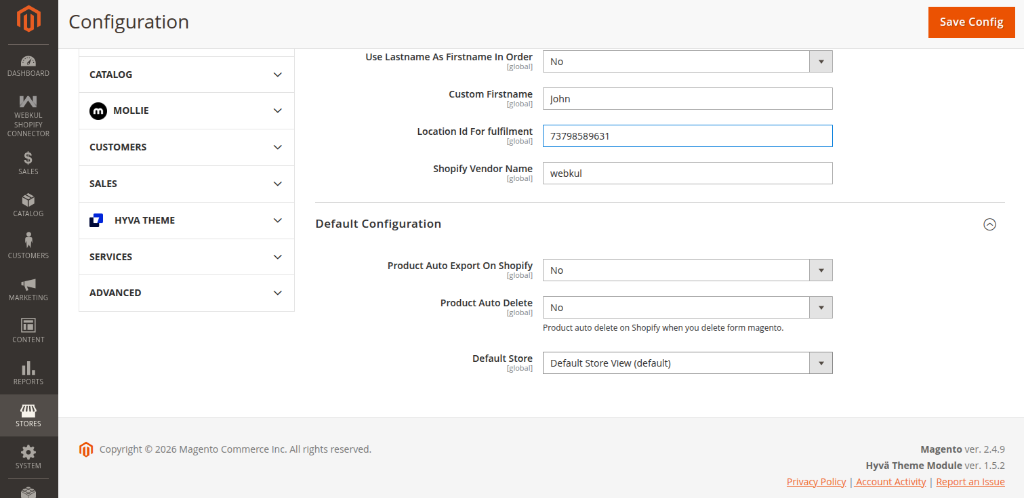
Here the admin will configure the General Settings:
- Enable Module: Set to "Yes" to enable the Shopify Connect module for your store.
- Update Product Qty: Set "Yes" to allow updating the product quantity on the Shopify store after an order is placed on the Magento store.
- Update Products: Set "Yes" to allow product updates on the Shopify store if the product is updated on the Magento store.
- Use Lastname As Firstname In Order: Set "Yes" to use the Lastname of the customer as the Firstname in Magento 2 for order import. Else, Set "No" to enable the Custom Firstname option.
- Custom Firstname: Input a custom Firstname for the customer in the order.
- Location Id For fulfilment: Enter the location id of the Shopify store. To get the Shopify store location, log in to your Shopify account and navigate to the location section. Tap the location that you want to use and after that, in the URL you will find the Location Id.
- Shopify Vendor Name: Enter the Shopify store vendor name exactly as per your Shopify store account name.
Default Configuration
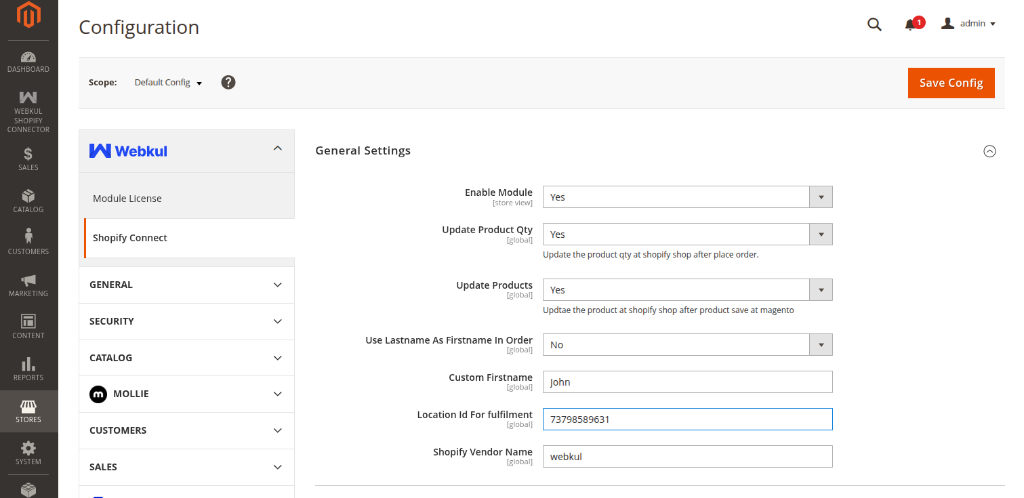
Under this section, the admin will configure the default behavior for synchronization:
- Product Auto Export On Shopify: Set to "Yes" to automatically export products created in Magento 2 to your Shopify store.
- Product Auto Delete: Choose "Yes" to automatically delete the product on Shopify when you delete it from Magento 2.
- Default Store: Select the default store view from the drop-down option. This dictates the default store view context for automatically exported products.