
Bulk CLI Command
The queue only handles reviews saved after the module was installed. To translate the reviews you already have — or to re-translate everything with a new model — use the bulk command.
php bin/magento Translate:All
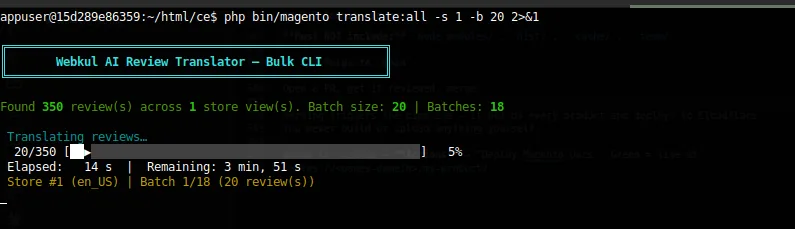
Options
| Option | Short | Default | What it does |
|---|---|---|---|
--batch | -b | 20 | Reviews sent to the model in a single API call. |
--store | -s | all store views | Store view ID to process. Repeatable. |
# Everything, default batch size
php bin/magento Translate:All

# Store views 1 and 3 only, 10 reviews per call
php bin/magento Translate:All -s 1 -s 3 -b 10

# One big-batch run against a fast provider
php bin/magento Translate:All --batch 50
What it does
- Loads every approved review, grouped so a review in several store views is loaded once.
- Chunks them by
--batch. - For each store view, sends each chunk to the model with that store view's locale.
- Upserts the results.
It bypasses the queue entirely and runs synchronously.
The work is reviews × store views
350 reviews × 3 store views = 1,050 translations
1,050 ÷ 20 per batch        =    54 API calls
Use -s to keep a run — and its cost — small.
Re-running is safe
The command upserts on review, product, and store view. Re-run it after switching model, or after changing a store view's locale, and rows are updated rather than duplicated.
Run it in screen or tmux
A backfill over thousands of reviews takes a long time. An SSH drop kills the process mid-run. Nothing is corrupted, but you start again.
Automating it
The queue already covers new reviews, so a scheduled bulk run is only useful for periodic re-translation:
0 3 * * * cd /var/www/magento && php bin/magento Translate:All -b 20 >> var/log/translate-all.log 2>&1
Next: Batch Size and CLI Output & Exit Codes.