
Select an LLM Provider
Stores → Configuration → Webkul → AI Review Translation → General Settings → LLM Provider
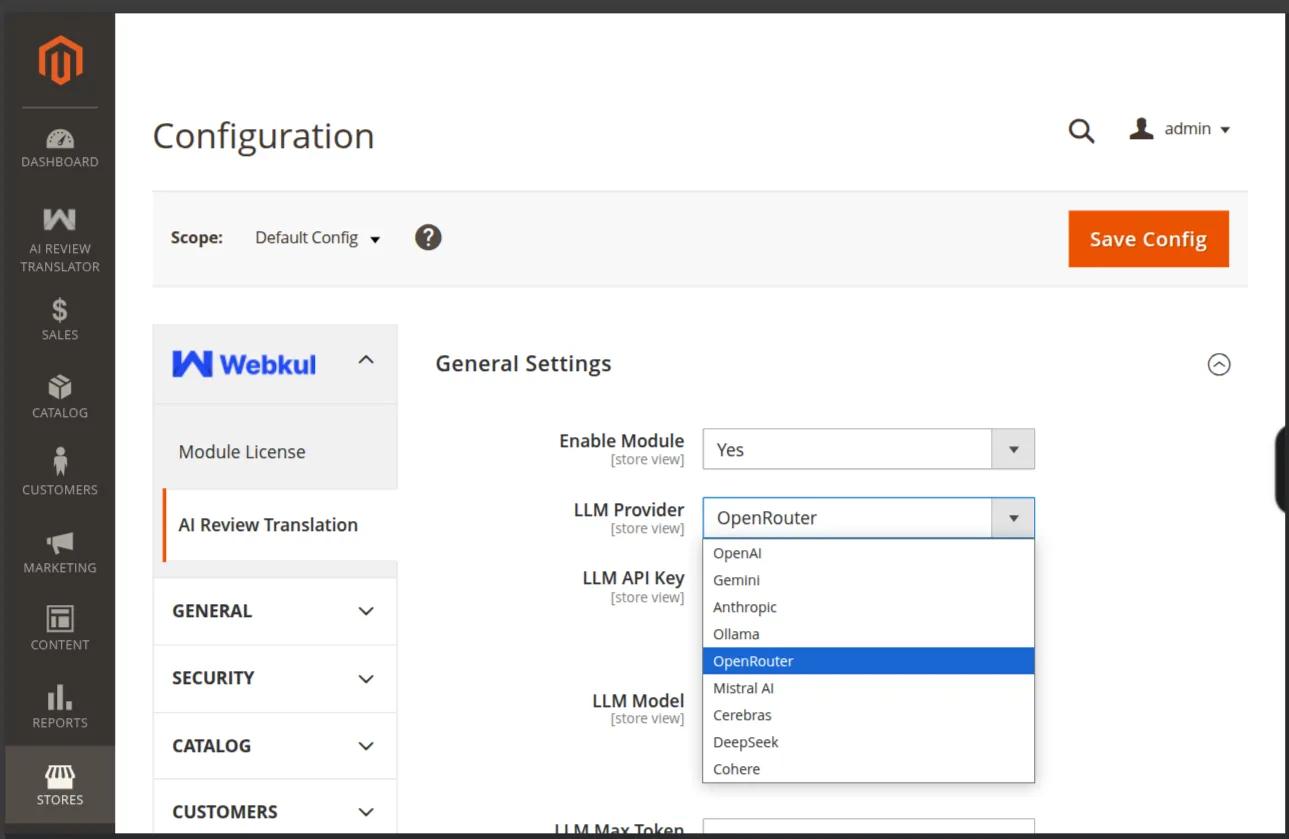
Pick one
Nine options: OpenAI, Gemini, Anthropic, Ollama, OpenRouter, Mistral AI, Cerebras, DeepSeek, Cohere.
The fields below the dropdown change with your choice:
| Choice | Fields you get |
|---|---|
| Any hosted provider | LLM API Key, LLM Model, LLM Max Token |
| Ollama | Is Authorized, Ollama Endpoint, LLM Model, LLM Max Token, Ollama Request Timeout |
For which key each provider needs and where to get it, see Provider Overview. For self-hosting, see Install Ollama.
Missing AI packages
Select a cloud provider without the Symfony AI packages installed and a warning appears right here, listing exactly what to composer require. Translation fails until you install them — see Install the AI Packages.
Enter the API key
Paste your key into LLM API Key. It is stored using Magento's encrypted config backend and rendered as a password field with a show/hide toggle.
Config path: aireviewtranslator/general/llm_api_key
One key field, not one per provider
There is a single LLM API Key per scope. Switching provider means replacing the key and validating again.
Ollama needs no key unless you put it behind a bearer-token proxy — see Connect Ollama to Magento.