
Product gallery
Shoppable feeds put products inside Instagram posts. This does the opposite: it puts Instagram posts inside the product, in the same gallery as your studio photography. A customer scrolling the product images sees the dress on a real person without leaving the page.
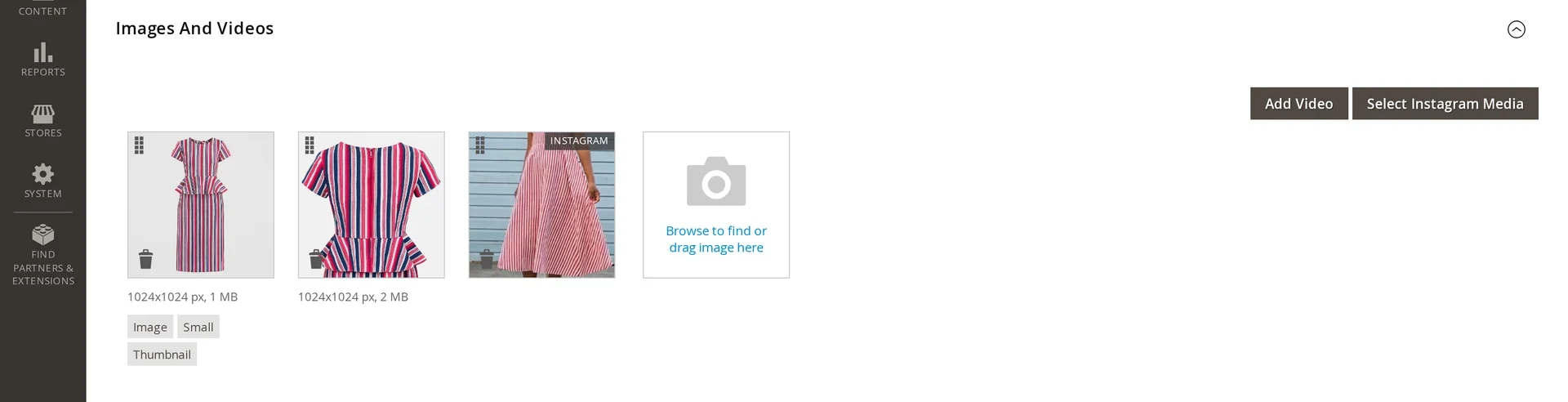
Attaching a post
- Open the product in Catalog → Products.
- Expand Images And Videos.
- Click Select Instagram Media.
- Pick one or more posts and confirm.
Attached posts appear as normal gallery entries, marked with an INSTAGRAM badge so nobody mistakes them for catalog photography. Drag them to reorder; position is respected on the storefront like any other image.
The picker loads posts a page at a time. Posts Per Selector Page in General settings controls how many.
What gets attached
Only approved posts are offered. Rejected and hidden posts never appear in the picker, which keeps moderation decisions meaningful in both directions.
Video posts attach as video gallery items. Two settings govern how they behave on the storefront, both on by default:
| Setting | Effect |
|---|---|
| Autoplay Video | Plays when it becomes the active gallery item |
| Loop Video | Restarts when it ends |
Remote links and expiry
If Store Media Locally is off, an attached post points at Instagram's CDN, and those links expire in about a day. A scheduled job refreshes them before they break — see Feed sync & cron.
Mirroring makes this moot: a local copy never expires. That is why production stores should turn it on.
Attaching is not tagging
Attaching a post to a product's gallery, and tagging a product on a post, are different actions with different results. Tagging drives the shoppable popup and the analytics attribution; attaching only adds an image to the product page. Doing one does not do the other.
Removing a post
Delete it from the gallery the same way you delete any product image. The post itself is untouched — it stays in the media library and in any feed that shows it.
See also
- Shoppable posts — tagging products on a post
- General settings — the Product Gallery settings
- Media library — approving the posts the picker offers