
Product Image Import Settings
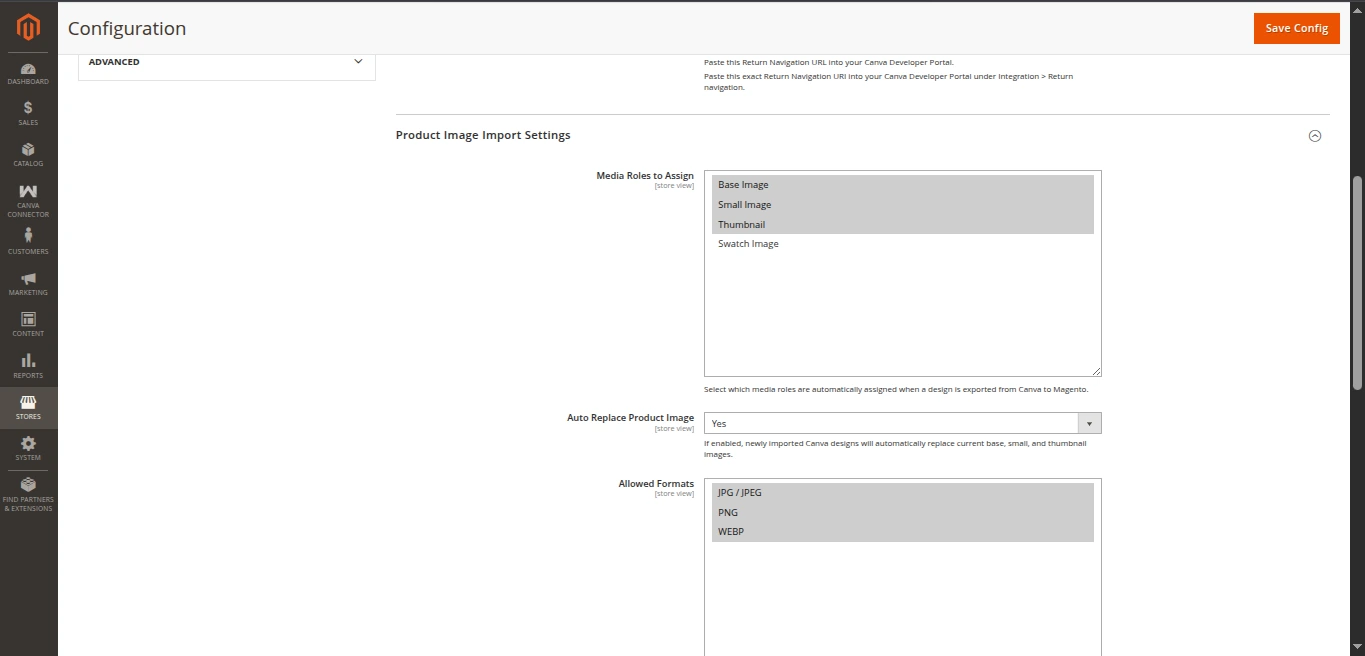
The Product Image Import Settings section controls how exported Canva designs are saved, formatted, and assigned to product media roles inside the Magento catalog.
Settings Reference
| Field | Type | Default | Description |
|---|---|---|---|
| Media Roles to Assign | Multiselect | Base Image, Small Image, Thumbnail | Roles automatically assigned to newly exported designs. |
| Auto Replace Product Image | Select (Yes / No) | Yes | When enabled, newly exported designs automatically overwrite existing default image roles. |
| Allowed Formats | Multiselect | JPG, PNG, WebP | Permitted image file formats accepted when saving designs to Magento. |
How Media Roles Are Handled
When you export a design from Canva:
Single-Page Designs:
- The exported image is saved to Magento's media catalog path (
pub/media/catalog/product/...). - The selected media roles (e.g.
Base Image,Small Image,Thumbnail,Swatch) are assigned to this new image. - If Auto Replace Product Image is set to
Yes, existing roles on earlier images are cleared and assigned to the new Canva design.
- The exported image is saved to Magento's media catalog path (
Multi-Page Designs:
- Page 1: Assigned the configured media roles (
Base Image,Small Image,Thumbnail). - Pages 2 through N: Saved into the product's additional media gallery slider as supplementary product images.
- Page 1: Assigned the configured media roles (
Allowed Formats
- PNG: Recommended for high-resolution graphics, transparency, and crisp product typography.
- JPG: Standard compressed format suitable for product catalog photos.
- WebP: Modern high-efficiency format delivering smaller file sizes for fast storefront loading.