
General Settings
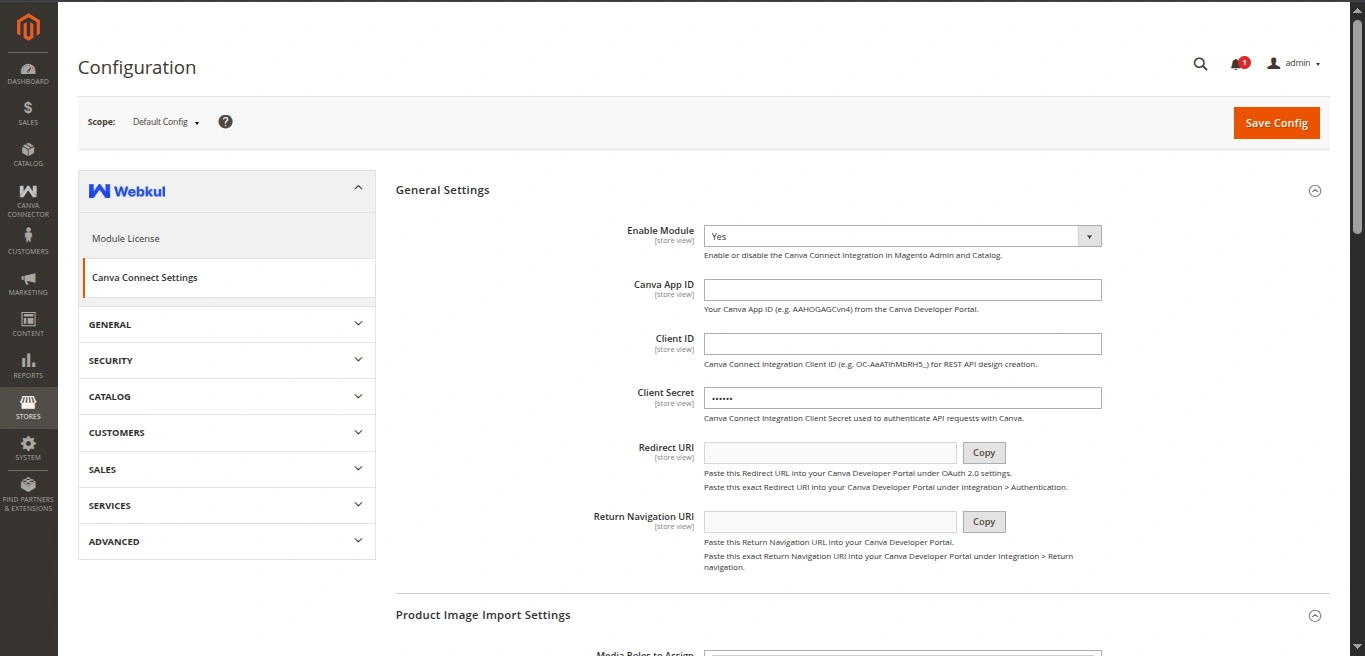
The General Settings section manages extension enablement, authentication credentials, and OAuth redirection endpoints between Magento and the Canva Developer Portal.
Settings Reference
| Field | Type | Default | Description |
|---|---|---|---|
| Enable Module | Select (Yes / No) | No | Master switch to enable or disable Canva Connector features across Admin and Catalog. |
| Canva App ID | Text | Empty | The App ID from your Canva App in the Canva Developer Portal. |
| Client ID | Text | Empty | The Client ID from your Canva Connect Integration. |
| Client Secret | Obscure (Encrypted) | Empty | The Client Secret from your Canva Connect Integration. Stored encrypted in Magento database. |
| Redirect URI | Read-only Display | Auto-generated | The OAuth 2.0 callback URL to register in Canva Developer Portal: {base_url}/canva/auth/callback. |
| Return Navigation URI | Read-only Display | Auto-generated | The Return Navigation URL to register in Canva Developer Portal: {base_url}/canva/auth/return. |
Detailed Explanations
Enable Module
When set to Yes:
- Adds the Design with Canva action button to the Catalog > Products admin grid.
- Activates REST API endpoints under
/rest/V1/canva/*. - Enables the Canva Connector admin menu and support links.
Canva App ID
Identifies your custom in-editor Canva application. Used by Magento to fetch the public JSON Web Key Set (JWKS) from Canva servers (https://api.canva.com/rest/v1/apps/{app_id}/jwks) to cryptographically verify RS256 signatures of Canva user design tokens.
Client ID & Client Secret
Used for backend OAuth 2.0 Authorization Code exchange with PKCE and token refreshes.
Redirect URI & Return Navigation URI
These fields display the exact URLs generated from your Magento Store Base URL. Copy and paste these directly into your Canva Developer Portal integration settings.