
Multi-Lingual & i18n Translation
The Magento 2 Two Factor Authentication extension is built using standard Magento 2 internationalization practices (__('Text')), making it translatable into any language for multi-store and regional deployments.
Setting Storefront Locale
To switch your Magento store view locale:
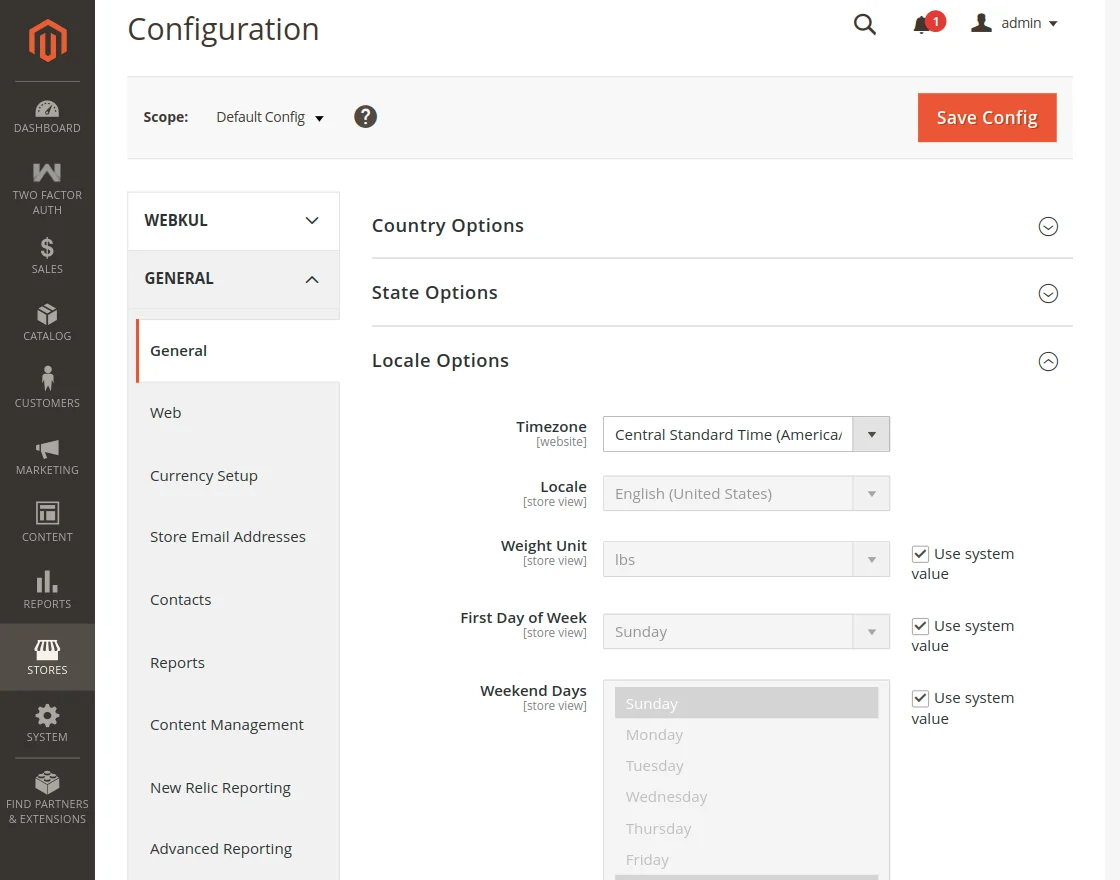
- In the Magento Admin Panel, navigate to Stores > Configuration > General > General.
- Expand the Locale Options group.
- Deselect Use system value for Locale.
- Choose your desired storefront language/region from the dropdown (e.g., French (France), German (Germany), Spanish (Spain)).
- Click Save Config.
Translating Extension Phrases via CSV
To customize strings or translate the module into other languages:
- Locate the module's i18n directory:
app/code/Webkul/TwoFactorAuth/i18n/
- Inside this folder, you will find
en_US.csv. - To add a new translation, create a new CSV file corresponding to your target locale code (for example,
fr_FR.csvfor French,es_ES.csvfor Spanish,de_DE.csvfor German). - Add the original phrase in the first column and your translation in the second column:
"Two-Step Authentication","Authentification en deux étapes"
"Enter Auth Code","Entrez le code d'authentification"
"Sign In another way","Se connecter d'une autre façon"
"Backup Code","Code de secours"
"Your account is locked due to too many failed 2FA attempts.","Votre compte est verrouillé en raison d'un trop grand nombre de tentatives infructueuses."
- Save the file and deploy static content:
php bin/magento setup:static-content:deploy -f
php bin/magento cache:flush