
Multi-Lingual & Language Translation
Webkul Multi Vendor Dropship for Magento 2 supports global commerce with complete multi-language localization, UTF-8 multi-byte encoding, and regional currency calculations.
Setting Storefront and Admin Locale
To configure your target regional language for any store view:
- Navigate to Stores > Settings > Configuration > General > General.
- Expand the Locale Options section.
- Select your target language in the Locale dropdown (e.g. English (United States), German (Germany), French (France), Spanish (Spain), etc.).
- Click Save Config.
Module CSV Translation
All interface labels, button names, column titles, and alert messages in the Vendor Dropship extension are declared through Magento's internationalization (i18n) dictionaries.
Step 1: Locate Translation Files
In your Magento server installation directory, open the module's translation directory:
app/code/Webkul/VendorDropship/i18n/
Inside this directory, locate the master dictionary: en_US.csv.
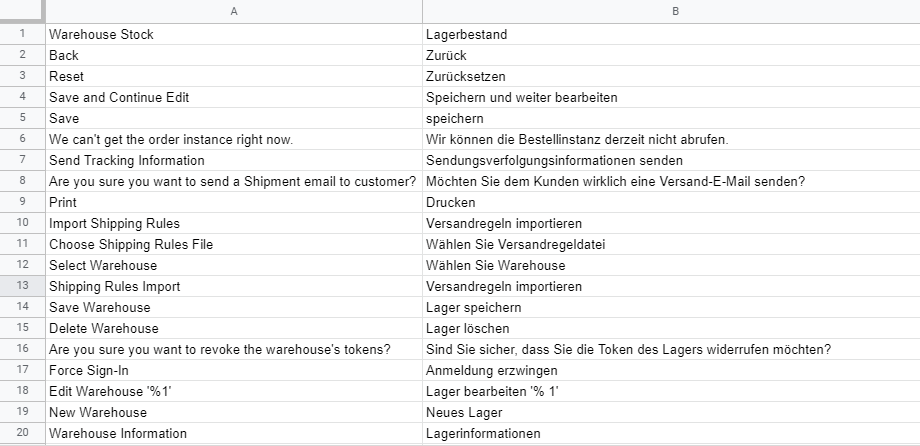
Step 2: Translate CSV Phrases
Open en_US.csv in any spreadsheet or UTF-8 text editor. The file contains key-value pairs formatted as:
"Original English String","Translated String"
- Retain the left column verbatim as the identifier key.
- Replace or supply the right column with the corresponding translated text in your desired target language.
- Save the translated CSV file using the ISO 639-1 language code and ISO 3166-1 alpha-2 country code:
- German (Germany):
de_DE.csv - French (France):
fr_FR.csv - Spanish (Spain):
es_ES.csv - Arabic (Saudi Arabia):
ar_SA.csv - Dutch (Netherlands):
nl_NL.csv
- German (Germany):
Step 3: Deploy Language Files
Place the new CSV file into the module's i18n folder:
app/code/Webkul/VendorDropship/i18n/<locale_code>.csv
Then deploy the static content and refresh caches via terminal:
php bin/magento setup:static-content:deploy <locale_code> -f
php bin/magento cache:flush