
Cache Warmer
The Cache Warmer feature speeds up your store by automatically pre-generating Full Page Cache (FPC) copies of catalog product and category pages in the background.
Instead of waiting for real customers to visit an uncached page and experience slow loading, Cache Warmer pre-builds all store pages ahead of time so every shopper gets instant, sub-second response times.
Why Use Cache Warmer?
The Challenge: Whenever Magento caches are flushed or updated, stored page caches are cleared. The first customer who visits an uncached page experiences a slow "cold cache" load, as the server must execute database queries and compile layout templates from scratch.
The Solution: With Cache Warmer:
- Zero Cold-Cache Delays: Pre-generates page cache entries before real customers visit them.
- Instant Sub-Second Page Delivery: Delivers pre-rendered cache files instantly to every shopper.
- Background Queue Processing: Uses Magento Message Queues (
cache.warm.up) to warm pages asynchronously without slowing down your server. - Reduced Database Load: Prevents CPU and database spikes caused by multiple customers accessing uncached pages simultaneously.
Admin Configuration
Admin Menu Location
Navigate to Stores → Configuration → Webkul → Store Optimization Settings → Warm-up Cache.
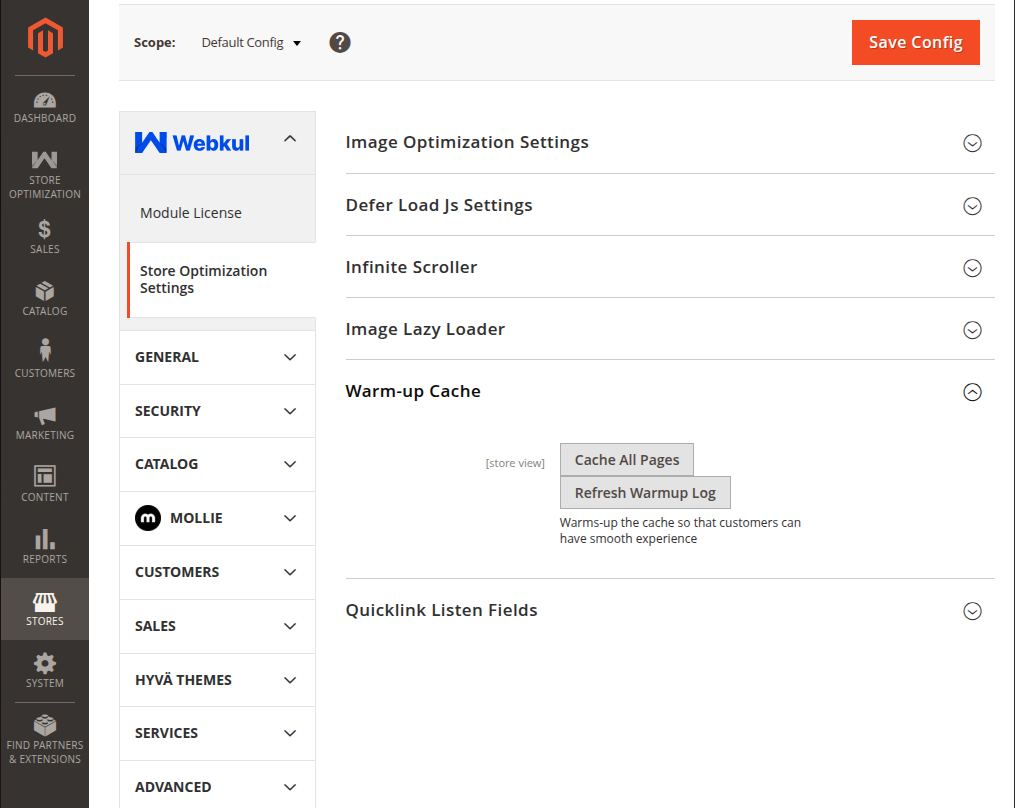
| Action Button | Control Type | Description |
|---|---|---|
| Cache All Pages | Button | Enqueues catalog product and category URLs into the cache.warm.up queue for background cache warming. |
| Refresh Warmup Log | Button | Refreshes and displays the latest cache warming log entries and execution status. |
Button Functionality Breakdown
- Cache All Pages: Clicking this button collects all enabled storefront category and product page URLs and publishes them to the
cache.warm.upbackground message queue topic for processing. - Refresh Warmup Log: Clicking this button reloads the log output display, allowing administrators to track real-time queue progress from
var/log/cachewarmer.logdirectly within the Magento Admin panel.
Running the Queue Worker
Execute the consumer daemon in your terminal or supervisor process:
php bin/magento queue:consumers:start cache.warm.up &
Log Inspection
Review cache warming activity in real-time:
tail -f var/log/cachewarmer.log