
Manage Customer Subscriptions
Administrators can monitor and manage all customer subscriptions from a centralized admin grid. Every time a customer purchases a recurring plan, a subscription record is created and mapped to their customer profile.
To view all subscription records, navigate in the Magento Admin panel to Recurring Plan for Discount > Manage Recurring Discount Subscriptions.
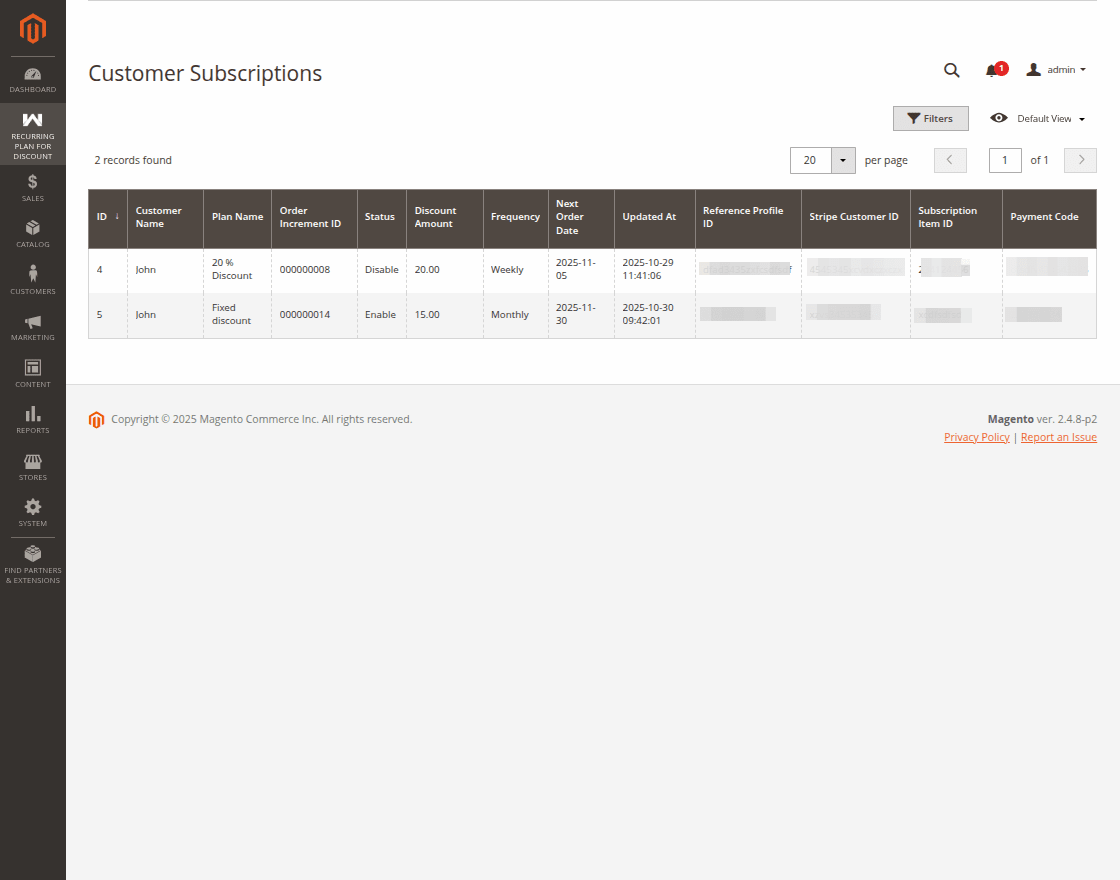
Subscription Grid Details
The Customer Subscriptions grid offers real-time insight into subscriber activity and payment health:
- Subscription ID: A unique system tracking identifier for each subscription lifecycle.
- Customer Name: The name of the subscribed customer.
- Plan Name: The specific discount plan subscribed by the customer.
- Order Increment ID: The increment ID of the order for which the subscription was created.
- Status: The current standing of the subscription:
- Enable: Subscription is currently valid, and the customer receives discounts on their purchases.
- Disable: Subscription is currently invalid, and the customer does not receive discounts on their purchases.
- Discount Amount: The discount amount being provided to the customer on the orders based on the plan.
- Frequency: The duration or interval between automatic renewals, as defined in the subscription plan (e.g., 1 Week, 1 Month or 1 Year).
- Next Order Date: The date when the next renewal order will be created.
- Updated At: The date when the subscription was last updated.
- Reference Profile ID: The Stripe or Paypal's Reference Profile ID or Payment Token of the subscription.
- Stripe Customer ID: The Stripe Customer ID of the subscription.
- Subscription Item ID: The Stripe Subscription Item ID of the subscription.
- Payment Code: The payment code of the subscription.
Automated Renewal Processing
Magento's background cron jobs handle subscription lifecycle events automatically:
- Cron Job:
webkul_recurring_create_subscription_order: Runs periodically to generate renewal orders for subscriptions approaching their renewal cycle. - Cron Job:
recurring_discount_send_renewal_reminders: Automatically dispatches reminder emails to customers before their payment method is charged.