
Incoming Products & Tracking
The Incoming Products view provides purchasing managers, warehouse teams, and inventory planners with a unified, SKU-centric overview of all merchandise currently in transit from suppliers.
Incoming Products Grid
Navigate to Purchase Management > Incoming Products to review scheduled deliveries.
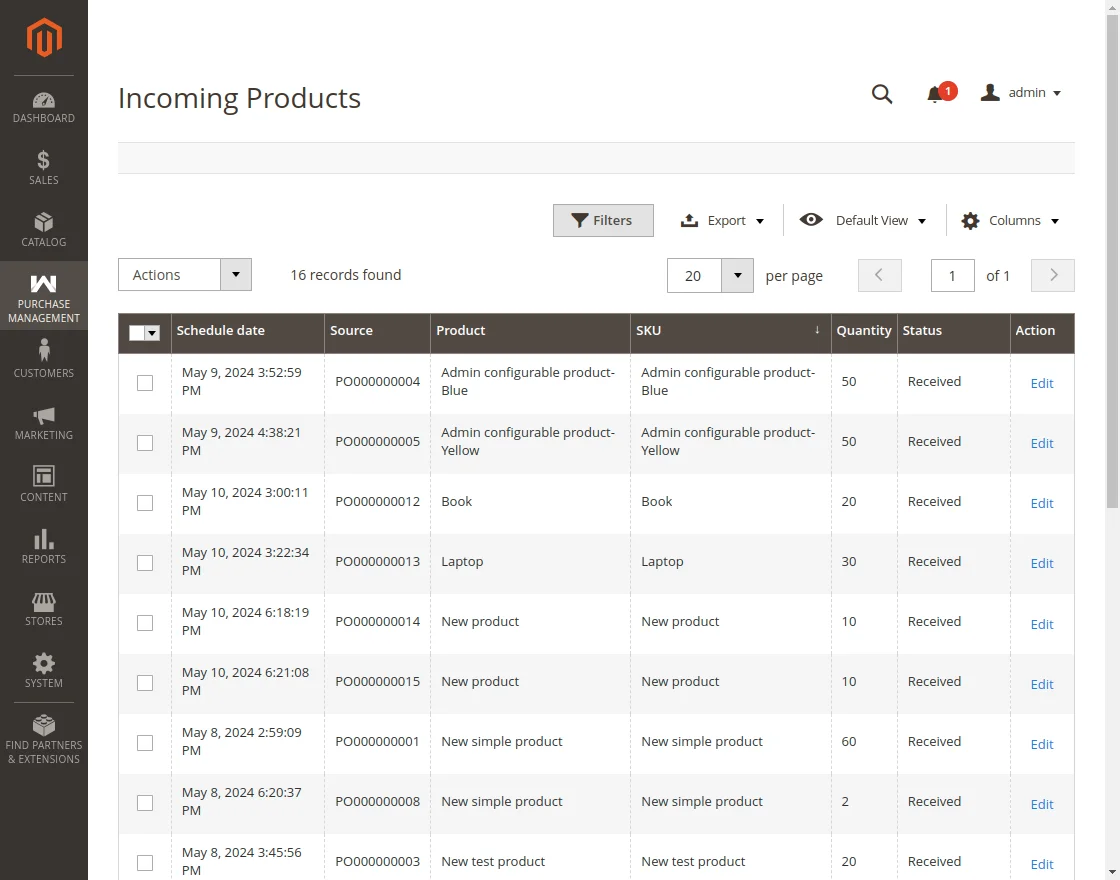
The grid outlines:
- Schedule Date: Expected delivery date at the warehouse.
- Source: Originating purchase order or vendor shipment reference.
- Product Name & SKU: Specific catalog item arriving.
- Quantity: Quantity of units scheduled in this transit.
- Status: Current receiving status (
Ready to Receive,Done,Pending). - Action: Click Edit to update delivery dates or add carrier logs.
Updating Scheduled Arrival Dates
Supply chain delays and freight rescheduling can impact warehouse staging. For items marked Ready to Receive, warehouse managers can update the planned receiving date:
- In the Incoming Products grid, click Edit on the targeted item.
- Update the Scheduled Date picker to the revised arrival date.
- Enter comments detailing the reason for schedule modification (e.g., Carrier customs delay, Consignment port rescheduled).
- Select whether to notify the supplier.
- Click Save.
Status Restriction
The scheduled arrival date can only be modified for products whose shipment status is currently in Ready to Receive stage. Once an item is received and marked Done, its delivery timestamp is permanently recorded for audit integrity.