
Vendor Request for Products
This module shows all the admin products to the vendors. Vendors can then choose from this list and submit a request to the admin to sell those specific products from their end.
From the vendor panel, the seller can go to the product list, select the admin products they wish to sell, and submit the request.
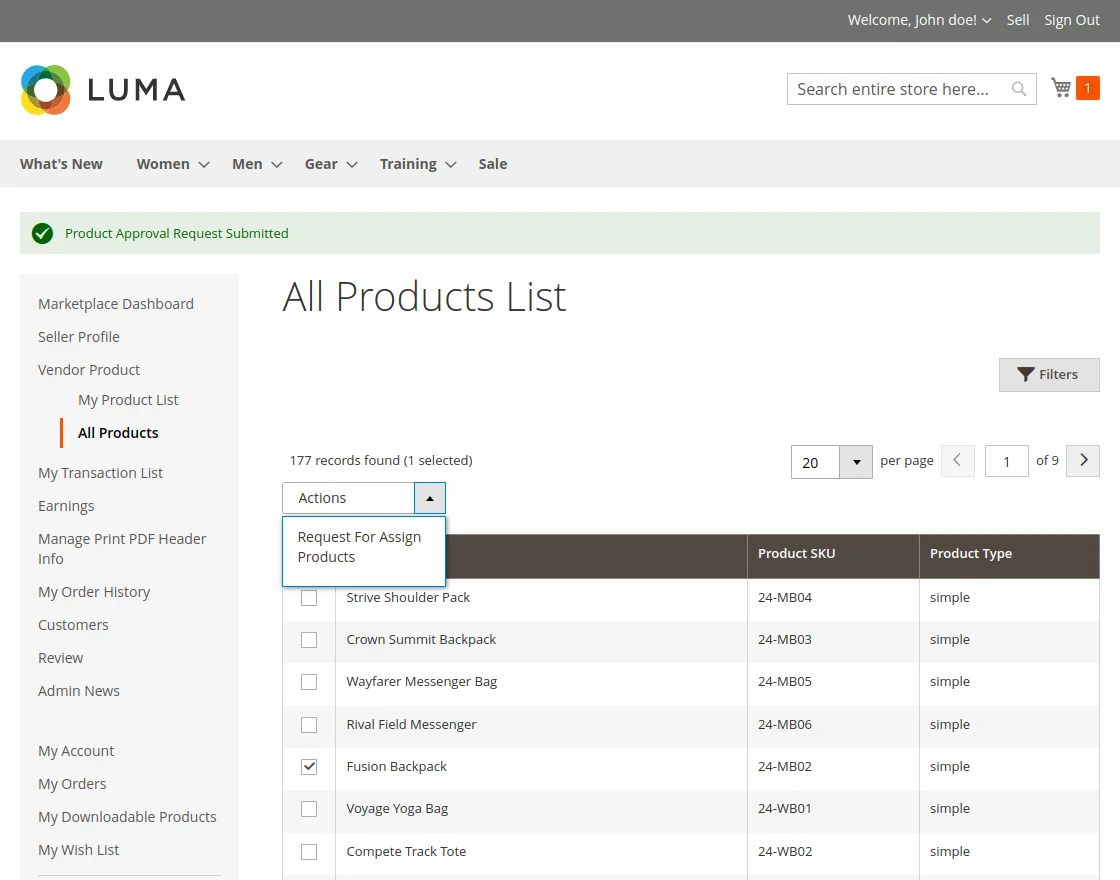
The request is then sent to the store admin for review. This workflow ensures that the admin retains control over what is sold on the marketplace while allowing vendors to easily pick and sell existing admin products.
How Vendors Select Products
Vendors have a streamlined interface to browse and request products from the central admin catalog:
- Search and Filter: Vendors can easily search through the admin's product list using product name, sku, or type to find exactly what they want to sell.
- Selection Process: Using checkboxes, a vendor can select one or multiple products at a time to request selling permissions.
- Submission: Once the desired products are selected, the vendor clicks the "Request to Assign Products" button to send the request to the store administrator.
Benefits of the Centralized Catalog
Allowing vendors to sell existing admin products rather than creating their own from scratch offers several advantages:
- Consistent Product Data: All sellers uses the same high-quality descriptions, specifications, and images managed by the admin.
- Reduced Duplication: Prevents the marketplace from being cluttered with multiple identical product listings from different sellers.
- Faster Onboarding: Vendors can start selling immediately by picking existing products instead of spending time creating complex product pages.
This feature is essential for marketplaces that want to maintain a clean, organized, and professional catalog.