
Admin Manage All Product Requests
The store admin can view and manage all product requests submitted by vendors. This centralized view allows the admin to keep track of the vendors attempting to add new products to their store and take necessary actions.
To view the requests, navigate to the Marketplace Management > Restrict Vendor Product > Manage All Product Requests.
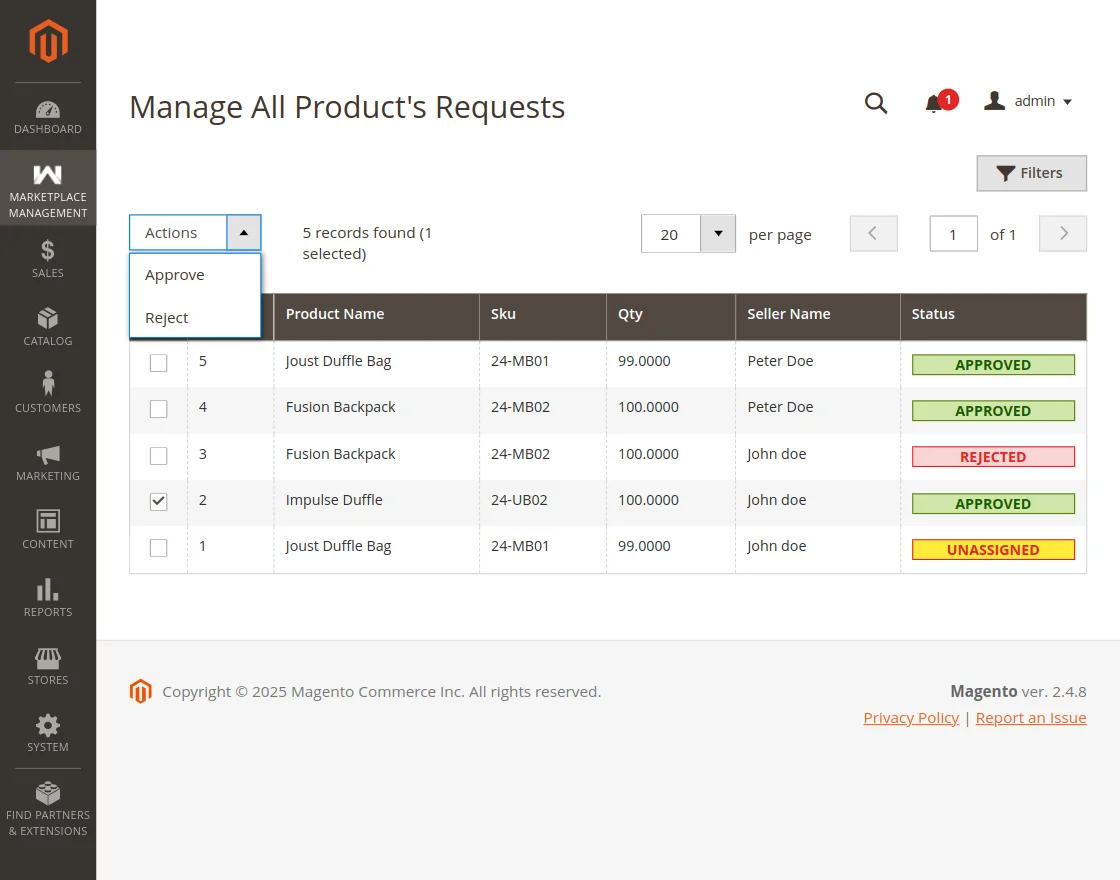
From this grid, the admin can see details such as the product name, vendor name, and the current status of the request. The admin can also use the grid's filters and mass actions to approve or disapprove multiple requests at once.
Grid Features and Information
The "Manage All Product Requests" grid provides a comprehensive overview of all pending, approved, and rejected products. The table includes several vital columns to assist the admin:
- ID: A unique identifier for the product request.
- Product Name: The title of the product submitted by the seller.
- Product SKU: The sku of the product submitted by the seller.
- Product Quantity: The quantity of the product available for sale.
- Seller Name: The name of the marketplace seller who requested to add the product.
- Status: The current state of the product request (e.g., Pending, Approved, Rejected, and Unassigned).
Mass Actions
To save time when managing large marketplaces, the admin can select multiple product requests using the checkboxes on the left side of the grid. Once selected, the admin can use the Actions dropdown to:
- Approve: Instantly approve multiple pending product requests, making them visible and active for the vendors.
- Reject: Reject multiple product requests from vendors.
This batch processing feature significantly streamlines the catalog management workflow for the store owner.