
Product Requests For Vendor
The admin can approve or reject the product requests submitted by the vendor from the admin backend.
When a vendor requests to add a product, it goes into a pending state. The admin can review the product details and choose to either approve or reject the request.
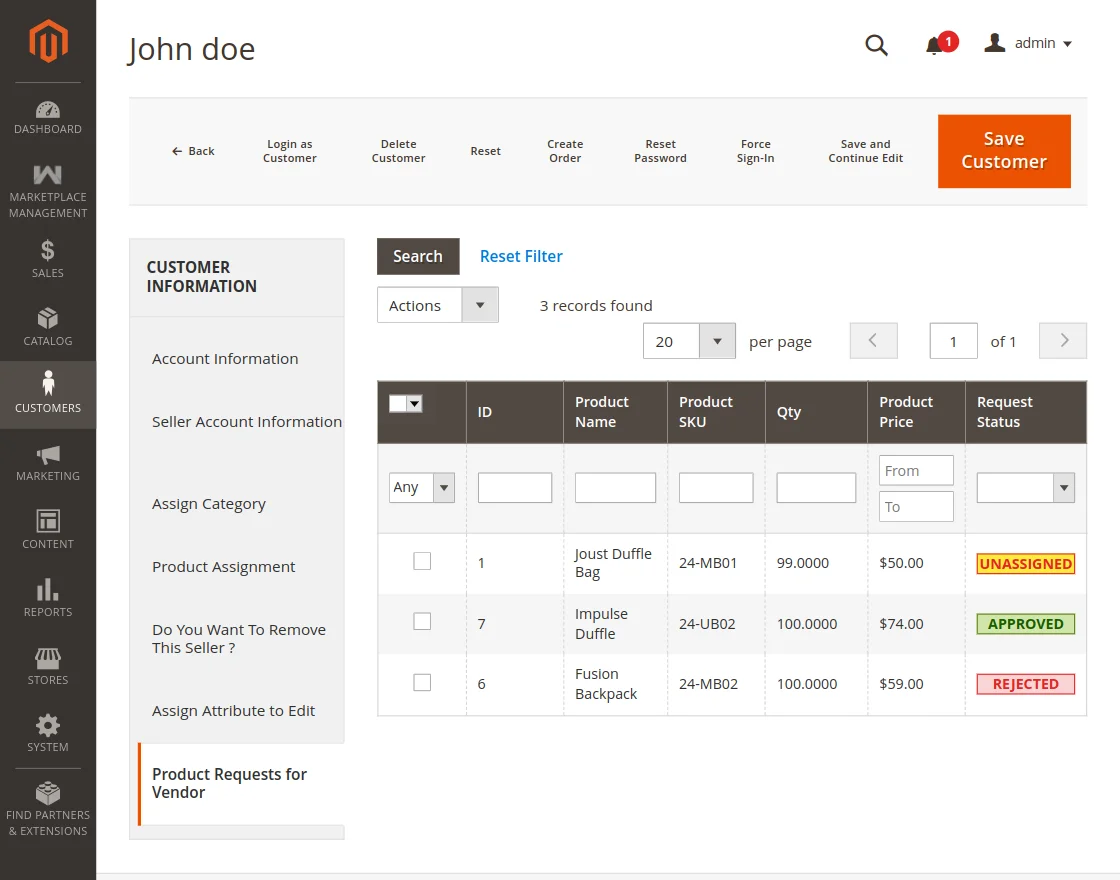
Once approved, the product becomes active and is available for vendor to view and edit from vendor panel. If rejected, the vendor will be notified.
Managing Individual Seller Requests
Instead of managing all product requests globally, the admin can drill down into a specific seller's profile. By navigating to the Manage Seller grid and opening the edit section for a particular vendor, the admin gets a dedicated view of that seller's product requests.
This localized view allows the store owner to evaluate a vendor's catalog holistically and make informed decisions on their specific product submissions.
Using Mass Actions for Quick Processing
Within the seller's dedicated product request grid, the admin has access to efficient mass actions. This is particularly useful when a vendor submits a large batch of products at once.
To process requests:
- Select Products: Use the checkboxes on the left side of the grid to select one, multiple, or all product requests submitted by this specific vendor.
- Choose Action: Click the actions dropdown and select either Approve or Reject.
- Submit: Apply the action to instantly update the statuses.
This targeted workflow ensures that the admin can manage high-volume vendors efficiently without losing track of individual seller performance and catalog quality.