
Module Configuration Overview
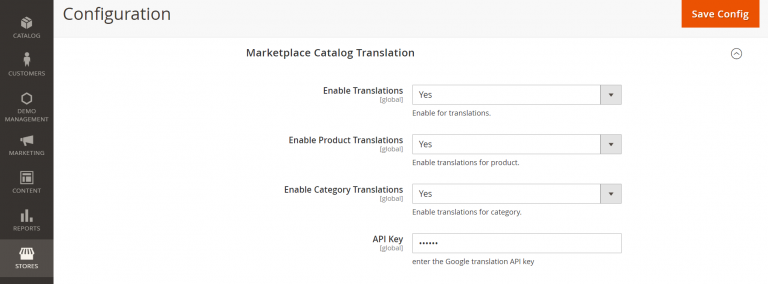
To configure the Marketplace Catalog Translation settings:
- Log in to the Magento Admin Panel.
- Navigate to Stores > Configuration > Marketplace Catalog Translation.
Setting Fields Reference
Configure the following fields in the module settings panel:
| Configuration Setting | Type | Description | Default / Recommended |
|---|---|---|---|
| Set Enable Translations | Dropdown | Enables or disables overall catalog translation functionality across the store. | Yes |
| Enable Product Translations | Dropdown | Enables automatic translation for product attributes (name, description, short description, meta info) on store view switch. | Yes |
| Enable Category Translations | Dropdown | Enables automatic translation for category names and attributes on store view switch. | Yes |
| API Key | Text Input | Enter your valid Google Cloud Translation API Key generated from Google Cloud Console. | [Your Google API Key] |
Saving and Applying Settings
After entering your Google Translate API Key and enabling translation flags:
- Click Save Config at the top right corner.
- Flush the Magento cache by navigating to System > Cache Management and clicking Flush Magento Cache.
Test API Connection
Ensure your API Key has billing enabled on your Google Cloud Console project. You can verify that translations are active by switching store views when viewing or editing a category or product.